AI + UX
AI Skipped the Stack
Current AI tools give you a text box and an output. But complex systems have never been controlled through a single interface. The AI industry has a UX problem — it skipped 40 years of abstraction layers that make complex systems controllable by humans.
Mar 7, 2026 · 13 min read
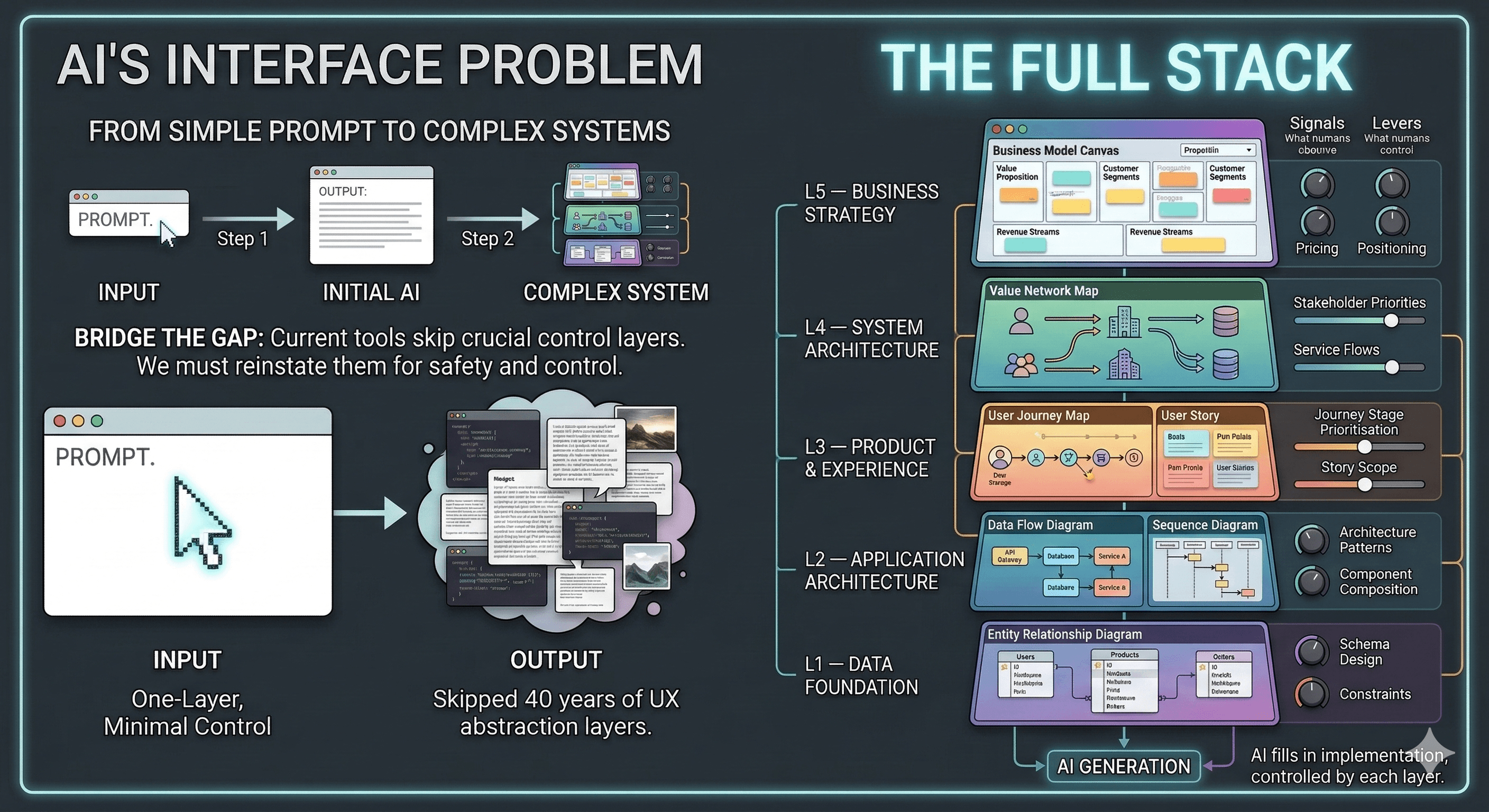
The first thing every AI coding tool gives you is a text box. Type what you want, press enter, get code. It works — sometimes brilliantly. But something fundamental is missing.
Think about how we actually build complex systems. An airplane cockpit has hundreds of instruments, each one showing a different signal and giving the pilot a different lever to pull. A factory has a control room with screens for temperature, pressure, throughput, quality. Software engineering developed its own control surfaces over 40 years: entity relationship diagrams, architecture diagrams, user journeys, business model canvases. Each one gives a different person a different view into the system and a different set of controls.
Current AI tools flattened all of that into a chat window.
This is not a technology problem. This is a UX design problem. And after 25 years of designing interfaces for complex systems, I think I can see what is missing.
The Missing Stack
Between your prompt and the AI’s output, there should be at least five distinct layers of abstraction. Each layer has its own visual language, its own practitioners, and — most importantly — its own signals and levers.
Signals are what you can observe: an entity relationship diagram shows you the data entities, their attributes, and how they relate. A user journey shows you the steps a person takes, where they struggle, and where they succeed. A business model canvas shows you who you are serving and how you make money.
Levers are what you can control: you can move a box on an ER diagram and the database changes. You can reprioritise a user journey and the product backlog reorders. You can change a revenue stream on the canvas and the business model shifts.
Current AI tools give you exactly one signal — the generated output — and one lever — the next prompt. That is like flying a plane with one dial and one button.
Layer 5 — Business Strategy
At the highest level of abstraction sits the business itself. The tools here are business model canvases, marketing campaigns, competitive positioning maps. The signals tell you who your customers are, what value you deliver, and how money flows. The levers let you change pricing, reposition against competitors, or target a different segment.
No AI tool today accepts a business model canvas as an input. You cannot draw your nine-block canvas, feed it to an AI, and say “build the product that serves this model.” Instead, you describe your business in a paragraph of prose, hope the AI infers the right constraints, and discover the misalignment three weeks into development.
The canvas is not just a planning artifact. It is a communication interface — between founders and investors, between product and engineering, and it should be between humans and AI.
Layer 4 — System Architecture
One level down from strategy sits the system of actors: stakeholders, users, partners, regulators, data sources, third-party services. The tools here are stakeholder maps, value network maps, ecosystem maps, and service blueprints.
These diagrams answer questions that AI tools never ask: who are all the actors in this system? How does value flow between them? Where are the touchpoints between the service and its users? What are the backstage processes that support each frontstage interaction?
When you ask an AI to build a product, it generates code. What it never shows you is the system it is building — the web of relationships between humans, services, and data that the code is meant to serve. You cannot see it. You cannot steer it. You only discover the AI’s implicit system model when something breaks.
A visual system map should be a first-class interface. You should be able to add an actor, draw a relationship, and have the AI adjust the architecture downstream.
Layer 3 — Product & Experience
The middle of the stack is where UX lives. User journeys, user stories, acceptance criteria, personas. These are the tools that connect human needs to product features.
A user journey is a sequence of steps a person takes to accomplish a goal. Each step has a context, an action, a thought, and an emotion. Each step can succeed or fail. A well-designed journey reveals the moments that matter — where frustration peaks, where delight is possible, where the product can differentiate.
Current AI tools skip this entirely. You type “build me a task management app” and the AI generates screens. But it never built a journey. It never identified the critical moment where a user almost abandons the flow. It never asked what success looks like from the user’s perspective.
User stories and acceptance criteria are even more precise: “As a project manager, I want to reassign overdue tasks so that no work is blocked.” These are structured, testable, and unambiguous. They are the perfect input for AI — far better than a paragraph of prose. Yet no AI tool surfaces a story map as an editable control layer.
Layer 2 — Application Architecture
This is the layer most developers think about first: data flow diagrams, class and object diagrams, sequence diagrams, component diagrams. The signals here are component boundaries, data flows, interaction patterns, and API contracts. The levers are architecture patterns, composition strategies, and technology choices.
When a developer asks AI to build a feature, the AI makes architecture decisions invisibly. It picks a pattern, chooses where to put business logic, and decides how components will communicate — all without showing the human what it chose or why.
Imagine instead: the AI generates an architecture diagram. You see the components, the data flows, the dependencies. You disagree with a decision — maybe the AI put business logic in the frontend and you want it in the backend. You drag the box to where it belongs. The AI regenerates the code to match your diagram.
This is how architects already work with junior developers. They draw the diagram, explain the pattern, and the junior builds to the blueprint. AI should work the same way — except the diagram should be bidirectional. Human edits the diagram, AI updates the code. AI generates code, the diagram updates to reflect reality.
Layer 1 — Data Foundation
At the bottom of the stack sits the data model. Entity relationship diagrams, database schemas, data dictionaries. The signals are entities, attributes, relationships, constraints, and cardinality. The levers are schema design decisions: normalisation, denormalisation, indexing strategies, relationship types.
The ER diagram is one of the most powerful communication tools in software engineering. In one glance, you see what data the system stores, how it relates, and what rules constrain it. Non-technical stakeholders can review it. Architects can critique it. Database administrators can optimise it.
When AI generates a database schema, you see a migration file. Lines of SQL or ORM code. You have to read the code to understand the data model — and by the time you discover the AI chose the wrong relationship type between two entities, you have already built three features on top of that assumption.
An ER diagram should be the first thing AI produces and the first thing a human reviews. Change a relationship from one-to-many to many-to-many on the diagram, and the AI should regenerate the schema, the models, the API endpoints, and the queries that depend on it.
The Full Stack in Action
Now imagine all five layers working together.
A product leader opens the business model canvas and defines the customer segments, value propositions, and revenue streams. The AI generates a system map showing the actors and value flows that serve this model. A UX designer reviews the system map, draws user journeys for each key actor, and writes user stories with acceptance criteria. An architect reviews the automatically generated architecture diagram, adjusts component boundaries and data flows. A data engineer reviews the ER diagram, tunes the relationships and constraints.
At every layer, a human controls the abstraction that matches their expertise. At every layer, the AI fills in the details below. Each layer constrains the layers beneath it — the business model constrains the system architecture, the user journeys constrain the product features, the architecture constrains the code, and the data model constrains everything.
This is not one person doing everything. This is a team of specialists, each with their own control surface, collaborating through shared abstraction layers — with AI as the engine that connects all the layers and generates the implementation.
What This Means Now
Fragments of this vision already exist. Figma-to-code tools translate visual designs into frontend components. Prisma schemas generate type-safe database clients. Infrastructure-as-code tools like Terraform let you define architecture declaratively and generate cloud resources. These are proof that the pattern works.
The gap is integration. No single AI tool exposes the full stack from business strategy to database schema as a set of interconnected, editable control surfaces. The current approach — chat-based prompting — will hit a ceiling. For simple features, a prompt is enough. For complex systems, you need the full cockpit.
The teams and tools that figure this out first will have an enormous advantage. Not because the AI is smarter, but because the humans are more in control. And that is, after all, a UX problem.
Where to Go from Here
This article is the first in a series exploring each abstraction layer in depth. Future posts will examine:
- The ER Diagram as AI Interface — how visual database design could steer AI code generation
- User Journeys Should Be AI Inputs — structured UX artifacts as prompt replacements
- A Business Model Canvas That Generates Products — the highest abstraction layer as an AI control surface
- What Happens When You Build Without a Blueprint — a case study of missing abstraction layers in practice